Assessment workflows
Xobin provides Workflow customizations for customers in the Standard Plan. Follow the steps below to customize workflows in Xobin.
Workflow types
Assessment Start: Automatically receive notifications when a candidate begins an assessment.
Assessment Submission: Get assessment results as soon as a candidate submits their assessment and the evaluation is complete.
Assessment updates: Get notified when a recruiter creates an assessment, or when an assessment is updated, archived, or deleted. With the events
assessments.createorassessments.updates.Redirection: Redirect Xobin data to a specified URL for seamless integration with your workflows.
Customize Workflows
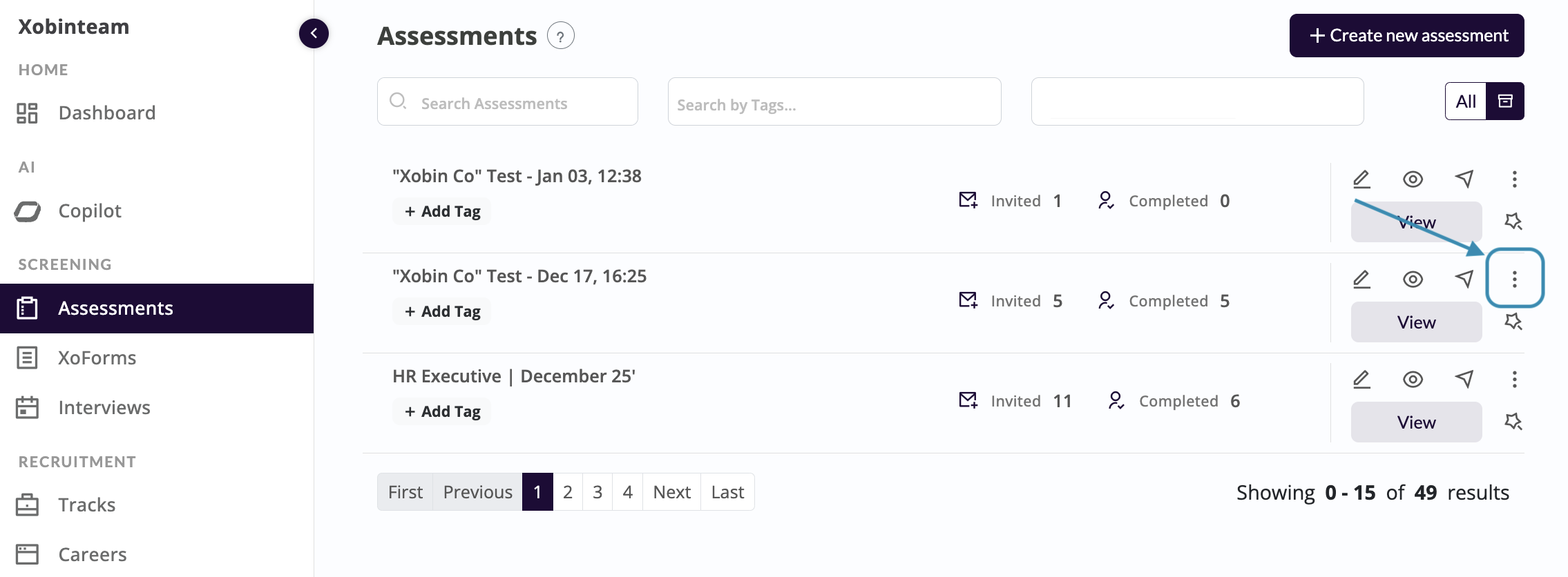
Navigate to the Assessments dashboard. Click on the test settings (three dots) for the desired assessment.
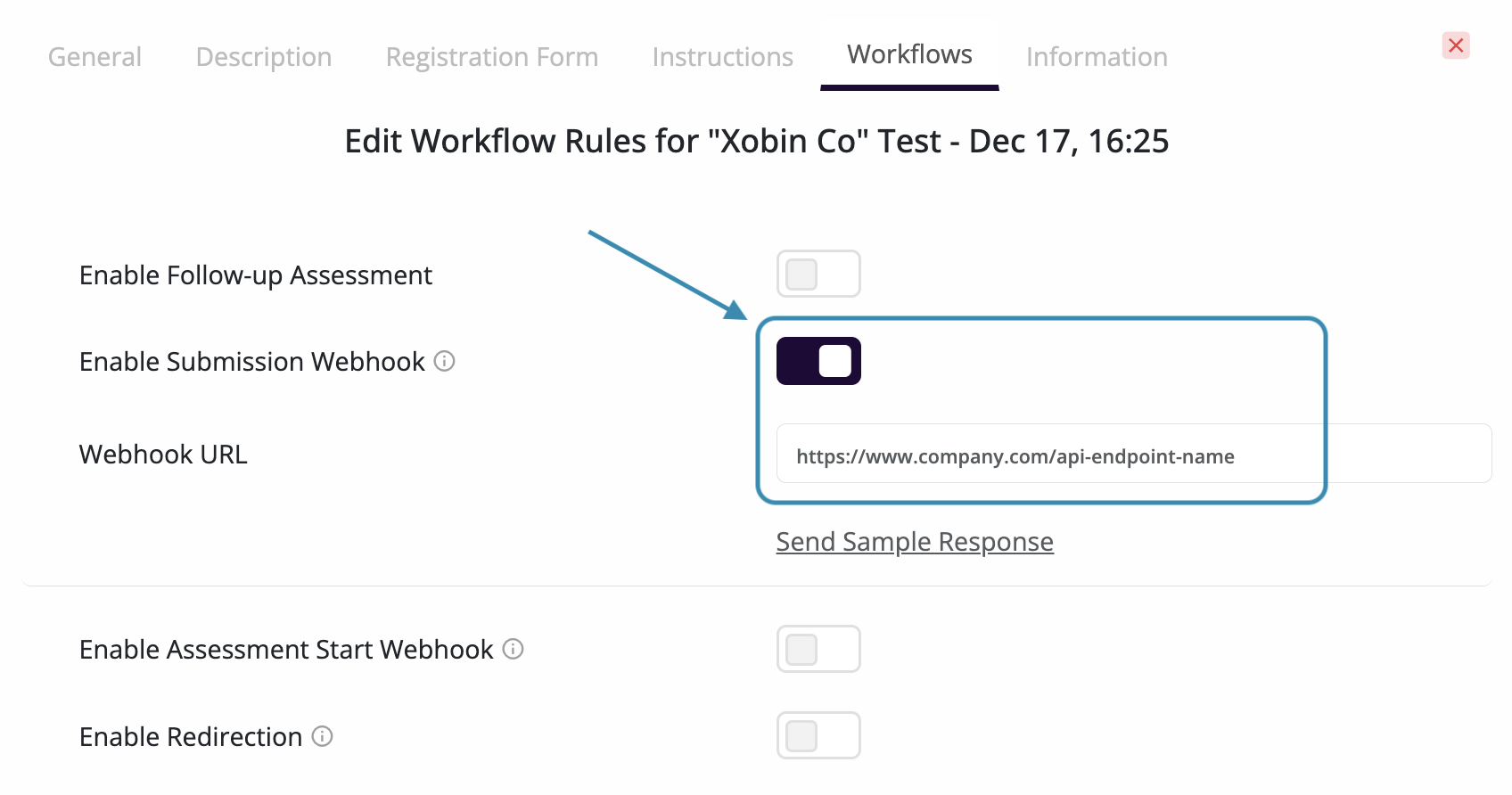
In test settings, click on Workflows tab at the top to customize workflow rules for your assessment. Enable the desired webhook types (including updates for assessment create and change events), paste each webhook URL, and use Send Sample Response to verify delivery.
Sample response
{
    "id": 2196821,
    "assessment_id": 53280,
    "started_at": 1737521866717,
    "name": "Garrett Bolton",
    "email": "[email protected]"
}
Create and update events share the same envelope. Only event differs: assessments.create when a new assessment is created, and assessments.updates for edits, archive, or delete. data includes the assessment summary and updated_by (the user who performed the action).
x-company-id is the ID of the company that the assessment belongs to.
{
    "event": "assessments.updates",
    "timestamp": "2026-01-15T10:00:00",
    "data": {
        "assessment_id": 12345,
        "assessment_name": "Sample Assessment",
        "status": "live",
        "created_by": {
            "name": "Jane Recruiter",
            "id": 1,
            "email": "[email protected]"
        },
        "creation_date": "2026-01-10T00:00:00",
        "last_updated": "2026-01-15T10:00:00",
        "assessment_duration": 60,
        "number_of_questions": 20,
        "number_of_sections": 2,
        "proctoring_status": null,
        "skills_included": ["Python", "SQL"],
        "question_types": ["objective", "code"],
        "updated_by": {
            "name": "Jane Recruiter",
            "id": 1,
            "email": "[email protected]"
        }
    }
}
{
    "assessment_id": "integer",
    "candidate_id": "integer",
    "completed_date": "string",
    "cut_off": "integer",
    "email": "string",
    "invite_status": "string",
    "name": "string",
    "offtab_count": "integer",
    "overall_percentage": "double",
    "registration_fields": [
        {
            "label": "string",
            "value": "string"
        }
    ],
    "report_id": "integer",
    "report_link": "string",
    "sections": [
        {
            "percentage": "double",
            "section": "string",
            "skill_wise_score": [
                {
                    "skill": "string",
                    "percentage": "float"
                },
            ]
        },
    ]
}
Authenticate webhook payload
When you receive POST requests from Xobin, it's essential to verify their authenticity and integrity to prevent malicious activities or data tampering. Each incoming POST request from Xobin includes an x-xobin-signature key in the header. This signature is generated by encoding a combination of your API_KEY and the payload of the request. For JSON webhooks such as Assessment create / update, use the exact raw request body (the same byte sequence as in the POST) when computing the hash.
- To validate the request, you need to follow these steps:
Take the payload of the request and use your
API_KEYto compute theHMAC-SHA256hash.Encode the resulting hash using
Base64 URLSafe encoding, without including any padding characters.Compare this generated signature with the
x-xobin-signatureprovided in the request headers.If the two signatures match, it confirms that the request is authentic and hasn't been tampered with during transit.
 1 import hmac
 2 import hashlib
 3 import base64
 4
 5 # Function to verify webhook
 6 def verify_webhook(data, hmacHeader, apikey):
 7     # Compute the HMAC digest of the data using the provided API key
 8     digest = hmac.new(
 9                 apikey.encode('utf-8'),
10                 data.encode('utf-8'),
11                 digestmod=hashlib.sha256
12             ).digest()
13
14     # Encode the digest into base64 format and remove padding characters
15     computed_hmac = base64.urlsafe_b64encode(digest).rstrip(b"=")
16
17     # Compare the computed HMAC with the HMAC included in the request
18     return hmac.compare_digest(computed_hmac, hmac_header.encode('utf-8'))
 1 import javax.crypto.Mac;
 2 import javax.crypto.spec.SecretKeySpec;
 3 import java.util.Base64;
 4
 5 // Function to verify webhook
 6 public boolean verifyWebhook(String data, String hmacHeader, String apiKey) {
 7     try {
 8         // Create a new Mac instance with SHA-256
 9         Mac mac = Mac.getInstance("HmacSHA256");
10         mac.init(new SecretKeySpec(apiKey.getBytes(), "HmacSHA256"));
11
12         // Compute the HMAC digest
13         String computedHmac = Base64.getUrlEncoder().withoutPadding().encodeToString(mac.doFinal(data.getBytes()));
14
15         // Compare the computed HMAC with the provided HMAC header
16         return computedHmac.equals(hmacHeader);
17     } catch (Exception e) {
18         e.printStackTrace();
19         return false;
20     }
21 }
 1 const crypto = require('crypto');
 2
 3 // Function to verify webhook
 4 const verifyWebhook = (data, hmacHeader, apiKey) => {
 5     // Compute the HMAC digest using SHA-256
 6     const hmac = crypto.createHmac('sha256', apiKey);
 7     hmac.update(data);
 8     const computedHmac = hmac.digest('base64url'); // 'base64url' gives URL-safe Base64 without padding
 9
10     // Compare the computed HMAC with the provided HMAC header
11     return computedHmac === hmacHeader;
12 };
 1 <?php
 2 // Function to verify webhook
 3 function verifyWebhook($data, $hmacHeader, $apiKey) {
 4     // Compute the HMAC digest using SHA-256
 5     $computedHmac = rtrim(strtr(base64_encode(hash_hmac('sha256', $data, $apiKey, true)), '+/', '-_'), '=');
 6
 7     // Compare the computed HMAC with the provided HMAC header
 8     return hash_equals($computedHmac, $hmacHeader);
 9 }
10 ?>
data: The payload received from the webhook.hmacHeader: The HMAC signature included in the request.apikey: The API key used for HMAC generation.
If you have any questions, reach out to your account manager for assistance.